A Tour of CodevOS
 The architect is in the centre, commanding a set of builder agents
TL;DR: CodevOS is an operating system that helps humans and AI agents build production-quality code together. You and an architect agent write specs, builder agents implement them in isolated git worktrees, and three independent AI models review every phase. It replaces the honor system (“AI, please follow the process”) with a deterministic state machine that enforces it. Over a 14-day sprint, one architect with autonomous builders produced 106 merged PRs — equivalent to a 3–4 person elite engineering team. Here’s what it actually looks like from the inside.
What CodevOS Actually Is
If you’ve read my previous articles — The Seven Spheres of Human-AI Co-Development or Beyond Code with Claude Code — you know I’ve been thinking about how humans and AI work together for a while. The Spheres framework maps different modes of working with AI, from smart autocomplete (Sphere 1) all the way up to managing hybrid human-AI teams (Sphere 7). Codev is the system I built to operate at Sphere 6, where you’re not just using AI to write code — you’re using AI to manage AI that writes code.
Here’s the core idea. I work with an AI agent as the Architect. Together we decide what needs building — a new feature, a bugfix, a refactor — and we express it as a specification. We iterate on the spec until I’m satisfied it captures what we want. Then the AI creates an implementation plan. I review it. We agree on the approach. Then I spawn builder agents into isolated git worktrees, and they implement the plan: breaking it down into phases, writing code, responding to reviewer feedback, and opening PRs. Three independent AI models (Claude, Gemini, and OpenAI’s Codex) review every phase. I do the integration review with the architect. The builder merges.
That’s the Architect-Builder pattern. It’s not a new idea — it’s how construction has worked for centuries. The architect doesn’t lay bricks. The builders don’t redesign the floor plan. What’s new is that both roles can be filled by AI, with a human providing direction, judgment, and approval at key gates.
Codev isn’t an AI model. It’s not a coding assistant. It’s not a VS Code extension. It’s a set of CLI tools, protocols, and infrastructure that orchestrates existing AI coding tools (Claude Code, Gemini CLI, OpenAI’s Codex CLI) into a structured workflow. You install it with npm install -g @cluesmith/codev, run codev init for new projects or codev adopt for existing ones, and start writing specs. You can find a step-by-step guide at codevos.ai/getting-started.
I chose the name codev as a nod to “co-development.” The human brings intent, judgment, and domain knowledge. The AI brings speed, tirelessness, and the ability to hold hundreds of files in context. Together they produce better results than either could alone.
Being in Sphere 6 has changed how I think about work. Recently I realized that one way to help people understand Codev would be to write a book about it. I could structure the content into chapters, spawn a separate AI to write each one, and have a first draft within hours. So I did — 11 chapters, all drafted in a single afternoon. I still have to proofread every word and add diagrams, but the very idea that you could wake up thinking “I should write a book” and have a rough starting point by dinner — that has never happened in history before.
If you approach Codev from Sphere 2 (spoon-feeding the AI one task at a time), it doesn’t make sense. Why do I need specs? Just build the thing. Why are there multiple agents? Seems overcomplicated. These aren’t wrong questions — they just come from a different sphere. Specs aren’t bureaucracy; they’re how the Architect communicates intent to its Builders. Multiple agents aren’t overkill; they’re how you stop being the bottleneck.
If You Already Use Claude Code
If you use Claude Code (or Cursor, or Copilot), you might be wondering: why do I need a system on top of a system? What does Codev add that I’m not already getting?
Six things, specifically.
Multi-model review. Codev uses three independent AI models (Claude, Gemini, Codex) as reviewers. Each catches different classes of issues: Codex finds security edge cases, Claude catches runtime semantics, Gemini catches architecture problems. During the 2.0 sprint, no single model found more than 55% of the bugs.
Context as code. Every feature produces a specification and an implementation plan, version-controlled in git alongside the source code. These natural language artifacts (specs, plans, reviews, architecture docs) form a context hierarchy that enables progressive disclosure: a new builder reads arch.md for the big picture, then its specific spec and plan for detailed work. You always know why something was built and how it was designed. The AI’s instructions live in the repo, not in someone’s clipboard or a chat history that’s already been compressed.
Enforced discipline. A deterministic state machine (Porch) enforces the process. You can’t skip the spec. You can’t skip the plan. You can’t skip the review. Human gates require explicit approval before implementation begins. Testing is enforced as acceptance criteria, not optional. This is one of the reasons Codev outperforms Claude, which is nowhere near as disciplined.
Agents help you coordinate agents. An architect agent works with you to define specs and plans, then spawns builder agents into isolated git worktrees. You direct the architect; the architect directs the builders. Instead of managing each AI session yourself, you manage one, and it manages the rest. Architects and builders send messages to each other asynchronously, so the pipeline keeps flowing without you relaying between sessions.
Annotation over direct editing. Codev is far more about annotating documents than directly editing code. Reviews, specs, and plans are documents that guide the work rather than the AI just hacking at files.
Whole lifecycle management. From idea through specification, planning, implementation, review, PR, and merge. Codev manages the entire lifecycle, not just the coding step.
None of these require you to stop using Claude Code. Codev orchestrates Claude Code (and the other AI CLIs) — it’s the layer above.
The Problem Codev Solves
AI coding tools are incredible. A skilled developer with Claude Code or Cursor can build things in hours that used to take days. But “fast” isn’t the same as “good,” and if you’ve spent any time with AI-generated code at scale, you’ve noticed the cracks.
Without structure, AI-generated code accumulates subtle bugs: race conditions, resource leaks, security oversights, test suites that look comprehensive but miss the critical edge case. The code compiles. The tests pass. And then something breaks in production because the AI confidently implemented a feature that doesn’t quite match what you intended. The problem compounds as the codebase grows: without careful management, the code becomes too complex for the AI itself to reason about, and each new change introduces more risk than the last.
A concrete example. During the Codev 2.0 sprint, a builder implemented a custom terminal session manager. The code looked correct. The tests passed. A multi-model review caught that the Unix socket was created without restrictive permissions — any local user could connect and read terminal output. That’s a security-critical bug that would have shipped silently without the review step. A single AI model will often miss the same edge cases it just introduced.
Most teams handle this in one of two ways. Option one: go full-vibe. Let the AI rip, ship fast, fix bugs later. This works until your codebase hits a complexity threshold where the bugs start cascading. Option two: go full-process. Code-review everything manually, gate every change behind a human reviewer. This works, except you’ve eliminated the speed advantage of having AI in the first place.
What if you could build a system that enforces discipline without slowing you down — the structure of option two with the speed of option one? That’s what Codev tries to achieve. And an earlier version of it — Codev 1.x — tried. But it had problems of its own.
The terminal layer was built on tmux, which is a terrible dependency. It breaks on some systems, it’s hard to install, and it’s confusing for anyone who doesn’t live in a Unix terminal. The dashboard was 4,900 lines of vanilla JavaScript — a file so large and tangled that even the AI struggled to modify it without introducing regressions. Every project ran its own Tower instance on its own port, which meant port conflicts, wasted resources, and a messy setup. State was stored in fragile JSON files that could corrupt if two processes wrote simultaneously. There was no mobile access — you had to be at your desk to keep the pipeline moving. And the protocol enforcement was an honor system: you told the AI “follow the SPIR process” and hoped it would. Often, it didn’t — it would skip consultation phases, implement multiple plan phases at once, or decide the spec was “close enough” and start coding.
The 2.0 rewrite — codenamed “Hagia Sophia” after the Istanbul masterpiece that has endured for 1,500 years by continuously reinventing itself while keeping its foundations solid — addresses every one of these problems.
The Core Primitives
Like a computer operating system has files, processes, memory, and a user interface, Codev has its own core primitives. Understanding these is how you understand the system.
1. Roles
Every agent in a Codev project has a defined role with clear boundaries.
The Architect works with you to decide what to build. I work with mine to write specifications, design plans, review PRs, and make architectural decisions. The Architect usually doesn’t write implementation code directly — it’s a strategic role.
The Builder decides how to build it. Each Builder gets a task and its own isolated slice of the filesystem using git worktrees. It fleshes out the spec and plan, implements the code, writes tests, responds to reviewer feedback, and creates PRs. Builders are resumable: their state is checkpointed to the filesystem via a YAML status file, so if one exhausts its context window, you spawn a fresh one that picks up exactly where the last one stopped. During the 2.0 sprint, four specs exhausted their context windows. Every single one recovered successfully — no work was lost.
The Consultants provide independent, read-only review. They evaluate code but never modify it. Codev uses three different AI models as reviewers because — and this was a genuine surprise — they bring complementary strengths. Codex excels at security edge cases and exhaustive test sweeps. Claude catches runtime semantics and type safety issues. Gemini catches architectural inconsistencies and build-breaking deletions. No single model catches everything. During the 2.0 sprint, 11 of 20 pre-merge catches were found by Codex, 5 by Claude, and 4 by Gemini — with almost zero overlap.
2. Protocols
A protocol defines the steps an agent follows to complete a piece of work. Codev ships with several, and you can define your own. The most important are:
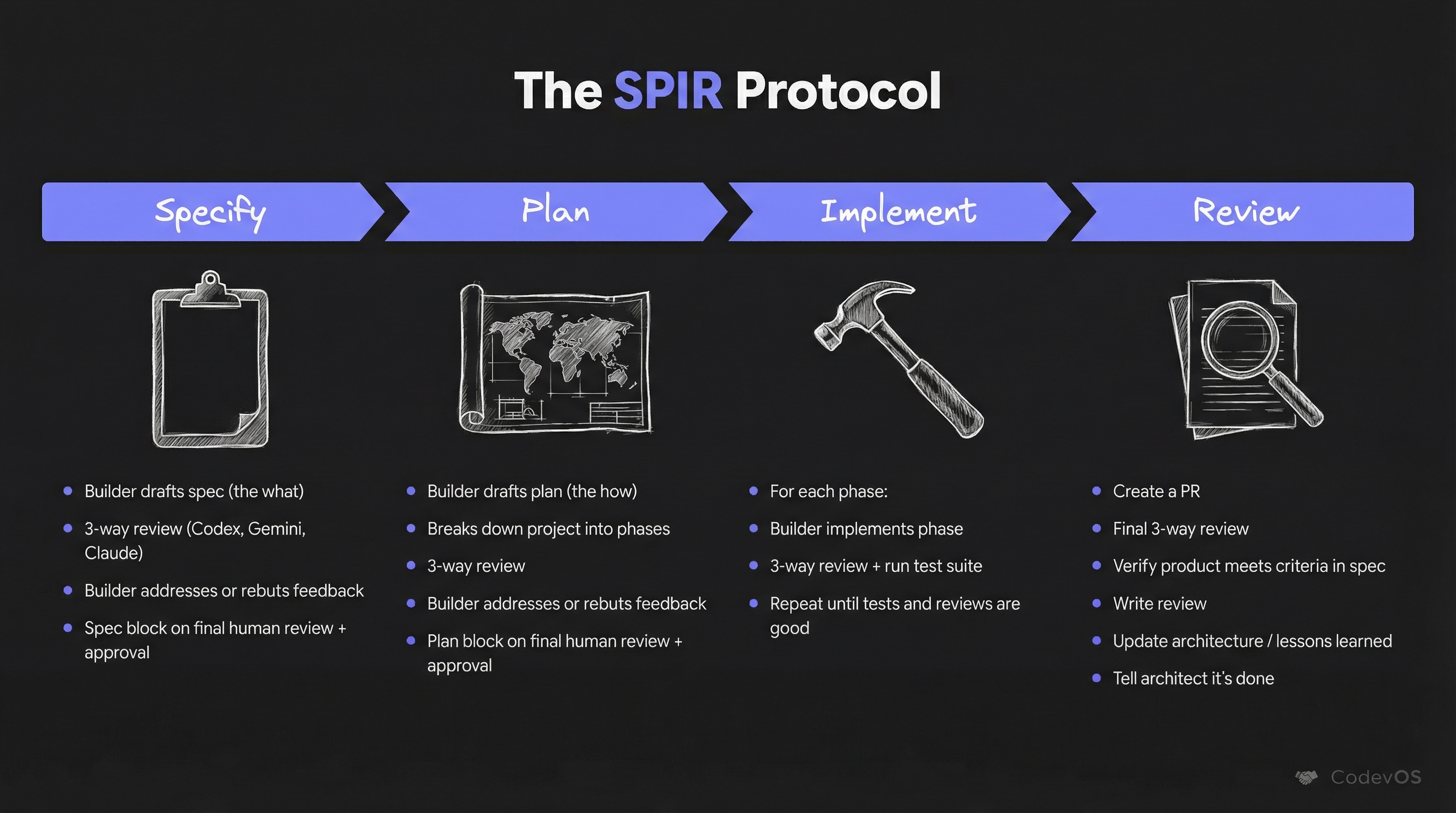
SPIR (Specify, Plan, Implement, Review) is the flagship protocol for new features. You start with a Specification focused on what to build. Then the Plan phase moves to how, breaking the problem into modular phases. The Implementation phase follows the plan. The Review phase wraps it up and captures lessons learned. Each phase gets a three-model consultation before the builder can proceed.
Bugfix has three phases: investigate, fix, and verify. Bugfixes operate without any human intervention — the builder goes from issue to merged PR autonomously. During the sprint, 66% of bugfix PRs shipped in under 30 minutes. Median: 13 minutes.
TICK is an amendment workflow for refining existing specs. Maintain is for periodic cleanup — dead code, obsolete documentation. Experiment is for disciplined exploration when you need to test an approach before committing to it.
Each protocol is defined as a combination of JSON (enumerating stages and their transitions) and prompts (explaining the protocol’s intent and getting injected into agents at each stage).
But here’s the thing: earlier versions of Codev would present phased execution to the agent and hope it followed. As Claude Code once told me, agents are good at reasoning but bad at discipline. What would happen is that the AI would get halfway through the plan and go off the reservation — skipping steps, implementing multiple phases at once, forgetting to consult.
This is where Porch comes in. Porch is the protocol orchestrator: a deterministic state machine that enforces whichever protocol is active. It introduces gates — checkpoints where a human must explicitly approve before the AI proceeds. The AI can’t skip the spec. It can’t skip the plan. It can’t skip the review. The builder asks Porch what it needs to do next, and Porch tells it — based on the actual state of the project, not the AI’s memory of what happened.
Porch also introduces the build-verify loop. After each phase, the builder must pass all tests before consultation. If tests fail, the builder fixes them and retries — Porch won’t advance until the build is green. This sounds obvious, but without enforcement, builders routinely move to the next phase with failing tests, intending to “fix them later.” They don’t.
Porch handles context recovery too. When a builder exhausts its context window and needs to be replaced, the new builder reads the status.yaml file to understand exactly where the previous one left off: current phase, completed phases, consultation verdicts, pending checks. This is what makes the process deterministic rather than probabilistic. The state lives in the filesystem, not in the AI’s head.
3. Context
Context is the shared memory of a Codev project. Like an operating system’s memory hierarchy, Codev repos have a context hierarchy.
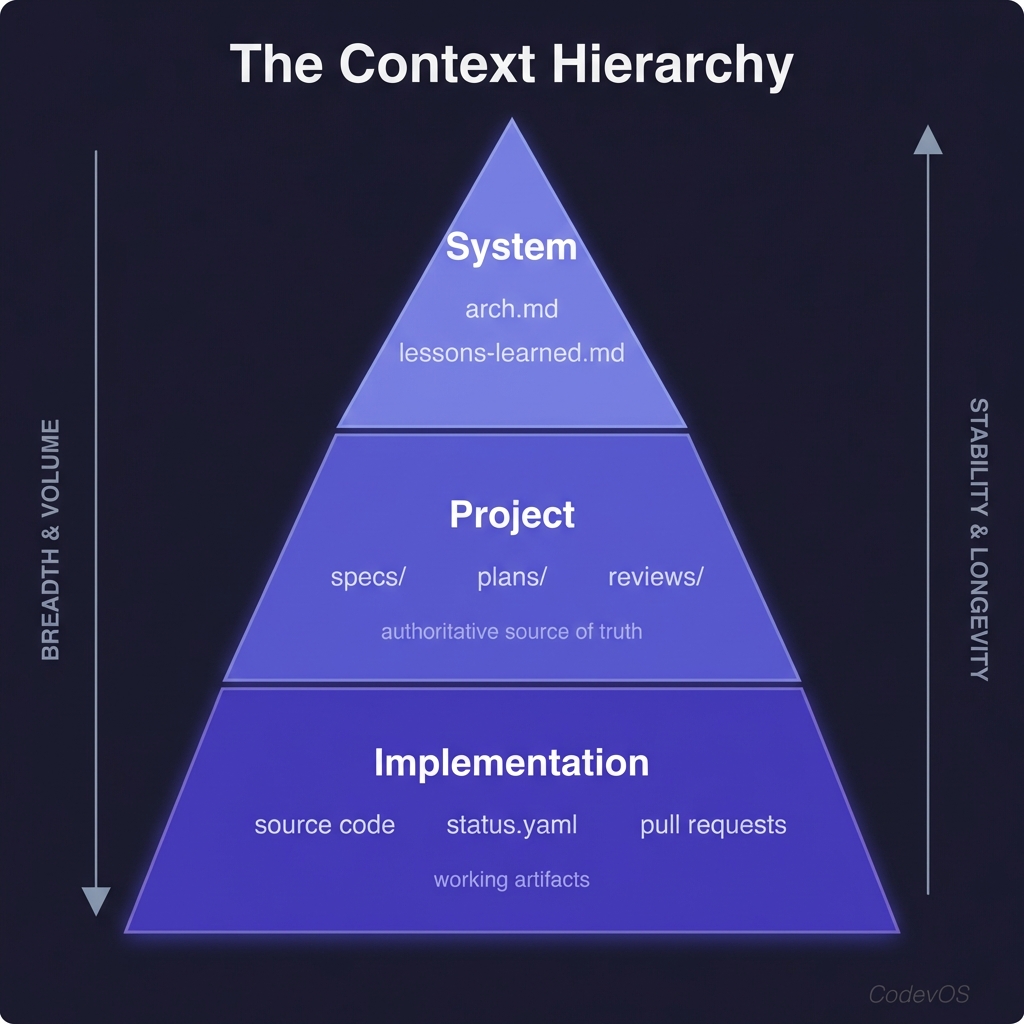
At the top is the system level: arch.md and lessons-learned.md provide a starting point for understanding the architecture and capturing what we’ve learned. Part of the SPIR review phase is updating these files.
In the middle is the project layer: specs, plans, and review documents. These are the authoritative source of truth for what the AI should build and how it should build it.
At the bottom is the implementation layer: source code, status.yaml (describing where we are in the build process), and the PRs generated as part of the workflow.
The key insight: we treat natural language context as code. Specs and plans are version-controlled alongside the source, reviewed with the same rigor, and serve as the authoritative reference for what the AI should build. When a builder starts work, it reads the spec and plan from the repo — the same source of truth that was reviewed and approved. When a spec changes, the change is tracked in git like any other code change.
This context hierarchy helps with progressive disclosure — you can quickly get an overview of the system, identify what you need to learn, and dig deeper, all while efficiently using the AI’s context window. A new builder doesn’t need to read every file in the codebase; it reads the arch.md to understand the overall system, then reads its specific spec and plan for the detailed work.
4. Interagent Communication
Architects and builders each run inside persistent terminal sessions managed by Shellper, Codev’s built-in terminal manager. Shellper is a custom PTY manager that replaced tmux entirely in 2.0 — zero external dependencies for terminal management. It provides session persistence with output replay on reconnect, and supports multiple browser tabs watching the same builder session.
The primary communication channel is af send. The architect can message any builder, and builders can signal the architect. For example: af send builder-7 "Check PR #83 comments for integration feedback". It’s lightweight and asynchronous: the message arrives in the builder’s terminal, and the builder processes it when ready.
5. User Interface
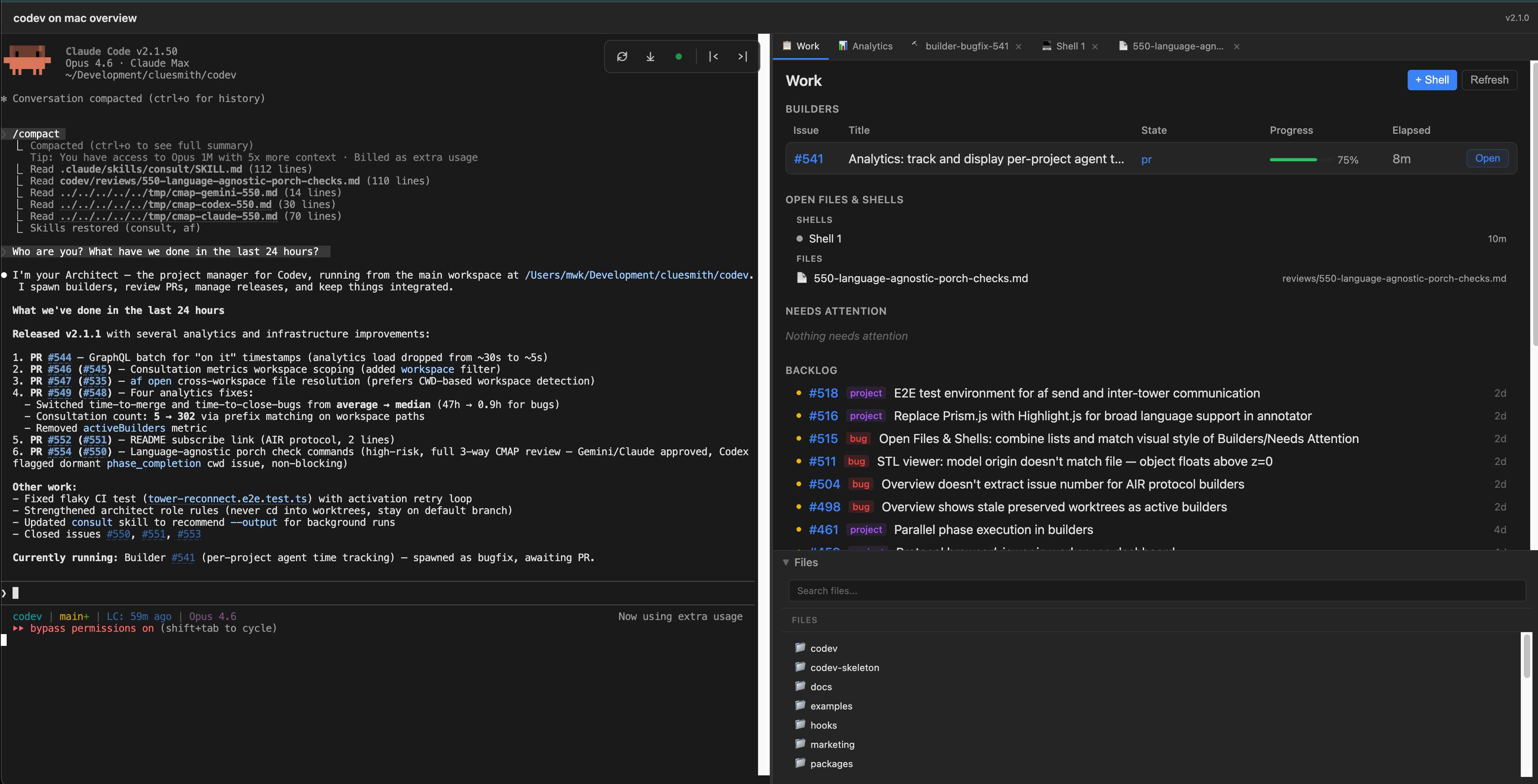
Tower is the top-level interface. It shows all your Codev workspaces and lets you jump into any of them. Each workspace has its own dashboard: the architect session on the left, a tabbed interface on the right showing builders, files, consultation results. This is where you spend most of your time — scanning builder status, jumping into sessions that need attention, opening files for review.
The dashboard is a React application that replaced the old 4,900-line vanilla JS nightmare. It’s a real web application with real components, type safety, and the ability to extend.
Codev Cloud provides remote access. You connect your local machine to codevos.ai, which creates a secure tunnel for accessing your builders from anywhere — your laptop at a coffee shop, your tablet on the couch, your phone on the subway. From mobile, you get what I call the “Director’s Chair” experience: you can see which builders are running, approve gates, read logs, and send commands. It’s not a full terminal on mobile — xterm.js has real limitations on touch devices, and I’d rather be honest about that than ship something frustrating. But for monitoring and approvals, it works well.
What It’s Actually Like to Use
Let me walk through a real session. Not hypothetical — based on the actual Codev 2.0 sprint, Feb 3–17.
You start your morning. You’ve got a feature in mind — say, adding multi-client support to Shellper so multiple browser tabs can watch the same builder session. You open the Tower dashboard, go to the workspace, and start a conversation with your architect AI. “I want multiple browser clients to be able to watch the same Shellper session simultaneously.” The architect starts asking questions, and together you write a specification.
This is the part that surprises people the most: the spec conversation is genuinely collaborative. I don’t dictate the spec to the AI; I describe the problem, and we work through it together. The AI asks questions I hadn’t considered: “Should late-joining clients receive a replay of historical output, or just see new output from the point they connect?” “What happens to the session if all clients disconnect — does it keep running or pause?” “Should we limit the number of concurrent watchers per session?” Some of these questions lead to real design decisions. Others I wave off. But every question answered in the spec is a bug that doesn’t get written into the implementation.
Once the spec is ready, three independent AI reviewers evaluate it — not the code, the spec itself. This catches structural issues early: missing edge cases, unclear acceptance criteria, conflicting requirements. Catches at the spec level are the cheapest catches. You approve, and the AI writes an implementation plan: which files to modify, what the phases are, what the acceptance criteria for each phase are. Three reviewers evaluate the plan. You incorporate what makes sense and approve again.
Now you spawn a builder:
af spawn 0118 --protocol spirThe builder sets up its isolated environment — a git worktree branched from main — and calls on Porch. Porch runs the build loop: implement Phase 1, run tests, consult three reviewers. The reviewers come back with findings. Maybe Codex caught a missing null check in the client disconnect handler. The builder fixes it, re-runs tests, and Porch advances. Maybe Claude flagged that the output replay buffer has no size limit — a memory leak on long-running sessions. The builder adds a configurable cap. Maybe Gemini raised a concern about a naming convention that’s actually correct. The builder writes a structured rebuttal, Porch logs it, and advances without re-consulting. About 18% of the time, the findings are false positives. That’s annoying but manageable — the rebuttal mechanism keeps the pipeline flowing.
Phase 2. Phase 3. Each phase follows the same loop: implement, test, consult, fix. The builder creates a PR.
The builder notifies the architect via af send: “PR #118 ready for review.” You and the architect do an integration review: does the PR fit the rest of the codebase? Does the approach make sense at a higher level? Are there implications for other features in flight? You approve. The builder merges.
Median time from plan approval to merged PR: 57 minutes. Bugfixes are even faster: 66% ship in under 30 minutes, median 13 minutes. The bugfix protocol skips the spec and plan gates entirely — the builder investigates, fixes, tests, and ships, without waiting for you.
The multiplier effect is the key. While one builder is implementing, you’re reviewing another builder’s PR. While that PR is being fixed up, you’re writing a spec for the next feature with the architect. The builders work in parallel in their isolated worktrees — they can’t step on each other’s toes. Your job is to keep the pipeline fed with specs and approvals, and to do integration reviews. With the architect’s help, I’m comfortable running 6 bugfix builders at once. SPIR features take more attention — I usually run 2–3 of those concurrently, keeping an eye on their consultation feedback and making sure the builds are progressing.
This is what Sphere 6 feels like in practice. You’re not writing code. You’re not debugging. You’re directing: deciding what to build, reviewing what was built, and keeping the pipeline flowing. The skills that matter shift from “can I write this algorithm” to “can I express this requirement clearly” and “can I evaluate whether this implementation actually meets the requirement.”
You can also do this from your phone. I’ve approved gates from the subway. I’ve read builder logs on my couch. The Director’s Chair mobile experience isn’t a full development environment — you can’t write code on a phone, and I’m not going to pretend otherwise. But for monitoring builder progress, approving gates, and sending quick messages to builders? It works. And it means the pipeline keeps moving even when you’re not at your desk.
The Numbers
Codev is self-hosted: I use Codev to build Codev. Here’s real data from the sprint to Codev 2.0, Feb 3–17, 2026. All numbers come from a comprehensive development analysis I did with the architect.
Output:
- 106 merged PRs in 14 days (53 per week)
- 801 non-merge commits
- 38 hours 12 minutes of total autonomous implementation time
- 85% of feature builders completed fully autonomously after plan approval (22 of 26)
- Median autonomous implementation time: 57 minutes
For context, an elite engineering benchmark (LinearB 2026, 8.1M PRs analyzed) is about 5 PRs per developer per week. At 53 per week, the raw throughput matches a 3–4 person elite team. I want to be careful with this comparison. The PRs are real and the code is in production, but a solo developer on a codebase they built doesn’t face the coordination overhead of a team — no code review queues, no meetings, no cross-team dependencies. The comparison is directionally useful, not literally equivalent.
Quality control:
- 20 pre-merge bugs caught by multi-agent consultation during the sprint
- Across the full development period (spanning both the sprint and the week prior), multi-agent review caught 5 security-critical bugs before they shipped, including an SSRF bypass, a path traversal vulnerability, and unsafe file permission defaults
- Cost: $168.64 in consultation fees for the 14-day sprint. $1.59 per PR, $8.43 per bug caught. ROI: 3.4x (33 hours of estimated debugging time saved vs 9.7 hours of consultation overhead).
- 100% context recovery success rate — all 4 specs that exhausted context windows recovered via Porch’s
status.yaml
Reviewer complementarity: No single model catches everything.
- Codex: 11 of 20 catches — security edge cases, test completeness, exhaustive sweeps
- Claude: 5 catches — runtime semantics, type safety, the two most critical bugs
- Gemini: 4 catches — architecture, build-breaking deletions, near-zero false positives
I also ran a controlled comparison: the same feature (a todo manager with Gemini NL backend) implemented twice, once with unstructured Claude Code and once with Codev’s SPIR protocol. The experiment ran four rounds. Three independent judges evaluated both implementations each time:
| Dimension | Unstructured | Codev (SPIR) | Delta |
|---|---|---|---|
| Bugs | 6.7 | 7.3 | +0.7 |
| Code Quality | 7.0 | 7.7 | +0.7 |
| Tests | 5.0 | 6.7 | +1.7 |
| Deployment | 2.7 | 6.7 | +4.0 |
| Overall | 5.8 | 7.0 | +1.2 |
The unstructured version had 5 consensus bugs including 2 High severity. The Codev version had 3 consensus bugs, 1 High. The +1.2 quality delta has been consistent across all four rounds of testing. The biggest single improvement is deployment readiness (+4.0): Codev produced a multi-stage Dockerfile, standalone output, and deploy documentation. The unstructured version had none of that. SPIR produced a Dockerfile in 2 of 4 rounds; unstructured Claude Code never did — in any round.
The testing advantage is the most consistent finding across all four rounds:
SPIR produced 2.9x more test lines with broader coverage. Unstructured Claude Code is locked at a 0.26:1 test-to-code ratio across all four rounds — that appears to be the model’s baseline behavior without protocol guidance. SPIR’s consultation process pushes it to 0.79:1.
The right framing isn’t “Codev is expensive.” It’s “Codev lets you choose where to spend the budget.” Quick bugfixes and prototypes can run lean with the bugfix protocol. Features heading to production get the full SPIR treatment. The 85% autonomous completion rate means you’re not babysitting most builders — you approve the plan and check back when the PR arrives.
Note that it costs more and takes longer: In the controlled comparison, the unstructured implementation took ~15 minutes and cost $4–7. The Codev implementation took ~56 minutes and cost $14–19. That’s 3.7x more time and 3–5x more money. Consultation accounts for 45% of Codev’s build time and $4.38 of the added cost. For a throwaway prototype, that’s not worth it. For production code, the deployment readiness, test coverage, and security catches likely justify the premium. Each point of quality improvement costs about $9 extra.
Where This Is Going
Here are a few directions I’m thinking about.
Runtime-aware review. Right now, the three AI reviewers can only look at static code. The process lifecycle bugs that escape review are invisible because they require running the system and observing its behavior over time. Adding runtime analysis — profiling data, integration test results, resource monitoring — would catch an entire category of bugs that currently slip through. This is the most impactful improvement I can see.
Sphere 7 support. Right now, Codev is a one-architect system. What happens when multiple humans, each with their own builders, work on the same codebase? The protocol needs to handle concurrent specs that might conflict and cross-cutting reviews where one architect’s change affects another’s. I don’t have the answers here yet, but this is where the frontier is heading.
Getting Started
Codev is free and open source. Install it with:
npm install -g @cluesmith/codevFor a new project, run codev init. For an existing project, run codev adopt. The codev doctor command will check your setup and tell you if anything is missing — it verifies that you have the right Node.js version, git, and whichever AI CLIs you want to use (Claude Code, Gemini CLI, Codex CLI — you need at least one, and all three for the full multi-model review experience).
You can find a step-by-step getting-started guide at codevos.ai/getting-started. The GitHub repo has documentation including FAQs and tips.
If you’re operating at Sphere 3 or 4 and curious about what Sphere 6 looks like in practice — if you’ve been using AI to implement your designs but haven’t tried letting it help make the designs — the water’s fine. Come try it.
And if you’re already at Sphere 6, I’d love to hear how your approach compares. The more people working at the outer spheres, the faster we figure out what works.
Written with AI at Sphere 4 (Partner). I have reviewed every word and am fully responsible for the content.